

Building a Multi Agent System to Track Real Madrid Matches Using AWS Strands and Ollama
Cloud | AWS | DevOps | AI 📍 Toronto 🇨🇦 🚀 Cloud Architect @ AWS 👨🏽🏫 Professor
I like soccer and Real Madrid, but I’m not the diehard kind who can recite every fixture by heart. So naturally, I end up missing mid-week games and that usually end up to be the best matches. I wanted to solve for this…
Then at least I know which match is worth following, so even if I cannot watch it, I can still track the score online.
And I had three options…
🔺Google the fixtures manually (Zero points for style).
🔺Write a cron job to ping an API and send a dry text (Functional, but boring).
🔺Build a multi-agent system that finds the game, decides if the "hype factor" is worth it, and notifies me with a reason to watch.
Since we’re well past 2023, I chose the obvious one. 🤷🏽♂️
I spent the weekend building a local agentic system using AWS Strands and Ollama.
This project uses:
AWS Strands for agent orchestration
Ollama for running language models locally
A Football API for match data
Telegram API for notifications
What Is AWS Strands
AWS Strands is a lightweight agent orchestration framework that allows you to define agents, connect them to language models, and expose structured tools that those agents can call. Instead of writing manual glue code between LLM calls and functions, Strands lets you describe:
The agent’s role
The model it uses
The tools it can call
The rules it must follow
Strands handles the tool calling loop internally. When the model decides to call a tool, Strands executes the function, captures the output, and feeds it back into the model until the task completes.
In this project, Strands acts as the controller. It ensures the supervisor calls the analyzer first and the communication step second. It enforces order without requiring complex orchestration code.
What Is Ollama and Why Use It
Ollama is a local runtime that allows you to run open source language models on your own machine. It exposes a simple HTTP server, typically at:http://localhost:11434
Instead of sending prompts to a cloud provider, your application sends them to Ollama, which runs the model locally.
This gives you:
Full local control
No external inference costs
Faster iteration during development
No dependency on external model APIs
In this project, Ollama runs small models such as Gemma 2B to handle structured reasoning.
Installing Ollama on Windows
Step 1: Download
Go to the official website: https://ollama.com
Download the Windows installer.
Step 2: Install
Run the installer and follow the default setup. Ollama installs as a background service.
Step 3: Verify
Open PowerShell and run:
ollama --version
If installed correctly, it prints the version.
Pulling and Running a Model
To download a model such as Gemma 2B:
ollama pull gemma:2b
To see all installed models:
ollama list
To run the model interactively:
ollama run gemma:2b
To call the model from your application, send an HTTP request to:
http://localhost:11434/api/generate
Example:
curl http://localhost:11434/api/generate -d '{
  "model": "gemma:2b",
  "prompt": "What can you do?"
}'
Your Strands agent internally calls this endpoint when configured with OllamaModel.
High Level Design - Multi agent workflow
The system follows a simple multi step flow:
A supervisor agent receives a task.
An analyzer component fetches match data from a Football API.
The analyzer evaluates whether the match is worth watching.
If the match crosses a defined threshold, a communication component sends a message using the Telegram API.
There are no complex distributed services. Everything runs locally except the external APIs.
The intelligence sits in the analysis step. The supervisor enforces order. The communication layer focuses only on delivery.
Understanding the Sequence Diagram
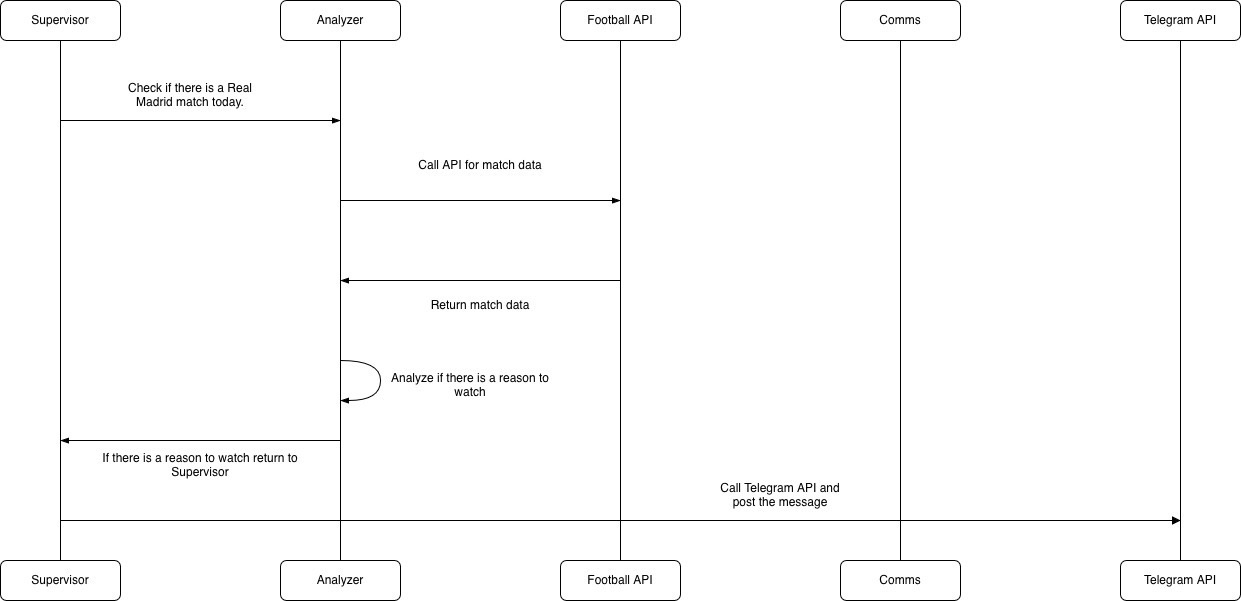
The sequence diagram above shows key components of the system and how the query flows. The flow is linear and disciplined.
Step 1: Supervisor Initiates the Task
The Supervisor starts the process by asking the Analyzer to check whether there is a Real Madrid match today. The Supervisor does not fetch data itself. It delegates.
This separation ensures orchestration logic stays clean.
Step 2: Analyzer Calls the Football API
The Analyzer sends a request to the Football API to retrieve match data. This includes opponent, competition, timing, and other relevant details.
The Football API responds with structured match data.
Step 3: Analyzer Performs Reasoning
Once the Analyzer receives match data, it evaluates whether there is a compelling reason to watch the match. This step uses a language model running locally through Ollama.
The reasoning can include:
Competition type
Rivalry level
Importance of the fixture
Context around standings
If the match meets the criteria, the Analyzer returns a formatted result to the Supervisor.
If not, it simply returns nothing significant.
Step 4: Supervisor Triggers Notification
If the Analyzer returns a positive result, the Supervis calls the Comms component.
Step 5: Comms Calls Telegram API
The Comms component sends the final message to the Telegram API, which posts the notification.
Why the System Struggled on My Laptop
The architecture was simple but the limitation was hardware.
My laptop runs on an older Intel i5 processor with only 2GB of VRAM. Even small models require consistent memory allocation. When GPU memory is insufficient, the system offloads computation to system RAM, which increases latency and reduces stability.
What I observed:
Slow inference times
Occasional freezing
Inconsistent reasoning output
Reduced reliability when chaining multiple steps
Multi step workflows amplify instability because each step depends on the previous output. When inference becomes slow or inconsistent, the whole pipeline suffers.
Building locally forced me to understand how models are loaded, served, and executed. That insight is difficult to gain when everything runs behind a managed API.


